Account settings
Account settings are reached from the user menu in the top bar. They apply to you, not to a Workspace.
Open personal settings in Flowpane. Sign in if prompted, then choose the section you need from the Personal navigation.
Explore the Personal navigation below to find the guide for the setting you need.
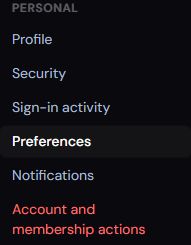
Choose a Personal navigation item to find the corresponding account settings. These settings apply to you rather than a Workspace.
Screenshot captured 2 October 2026.
- Profile — full name, email and job title
- Security — password
- Sign-in activity — observed sign-ins and sign-out controls
- Preferences — timezone, date format and theme
- Notifications — email notification preferences
- Organisation — company details, contacts and Child Organisations
- Workspaces — every Workspace you belong to, with pinning
- Billing — plans, payment methods, invoices and referrals
- Usage — how much of each plan limit you have used
- Danger zone — leave an Organisation or deactivate your account
- Data residency — database location and processing information
Customer API keys and account-level integrations are unavailable for the current service. Site-level integrations such as Google Search Console live under each Site's settings.