How Flowpane works with your CMS
What a website's systems are configured to produce is not always what the public website delivers.
Every CMS turns settings into machine-readable output: a robots.txt response, XML sitemaps and page indexing directives. Between the setting and the response sit SEO extensions, themes, application code, server rules, page caches, CDNs and publishing processes. Each layer can reshape the output, so configuration, generated output and public behaviour can quietly diverge.
Flowpane makes that behaviour visible, understandable, governable and auditable. It observes what the public website actually delivers, brings in the platform's own view of its configuration, detects meaningful changes, and gives teams a controlled way to prepare, apply and verify corrections.
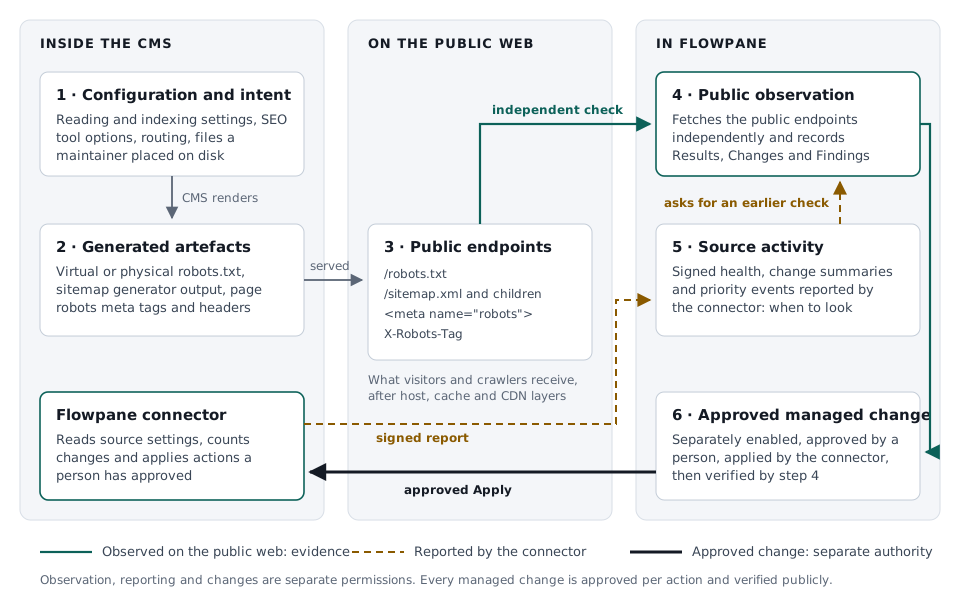
Select the diagram to open it at full size.
What your team gets
- Visibility: see exactly what the public website delivers to visitors, search engines and AI crawlers.
- Consistency: find contradictions between settings, generated files, page directives and public responses.
- Control: prepare, review and apply corrections through deliberate, role-based workflows.
- Evidence: keep every observation, change and decision in an auditable history.
- Continuity: detect meaningful changes as the website and the systems behind it evolve.
The six layers
| Layer | Where it lives | How Flowpane uses it |
|---|---|---|
| 1. Configuration and intent | CMS settings, SEO extension options, routing, files a maintainer placed on disk | Explains why the output looks the way it does |
| 2. Generated artefacts | The CMS's robots.txt, sitemap and directive output | Shows what the platform intends to serve |
| 3. Public endpoints | /robots.txt, /sitemap.xml, page robots meta tags and X-Robots-Tag headers, after host, cache and CDN |
What crawlers receive |
| 4. Public observation | Flowpane's independent fetch of layer 3 | The evidence behind every Result, Change and Finding |
| 5. Source activity | Signed health, change summaries and priority events from the connector | Tells Flowpane what changed and when to look |
| 6. Approved managed change | A specific action a person approved, applied through the connector | A correction, confirmed by a new public observation |
1. Configuration and intent
This is what someone meant to happen: a "discourage search engines" switch, an SEO extension's sitemap settings, an exclusion rule for a content type, or a robots.txt file uploaded by a developer. Intent explains a result; the public response confirms it.
2. Generated artefacts
The CMS turns intent into output. Many platforms generate robots.txt dynamically, build sitemaps on request and add indexing directives to each page's HTML. Several components can contribute to the same artefact: the core platform, an SEO extension, a theme, a hosting control panel or a file on disk. Knowing which one is producing the output is the first step in resolving any discrepancy.
3. Public endpoints
Public endpoints are what visitors, search engines and AI crawlers actually receive. Page caches, CDN rules, redirects between www and the bare domain, and security layers all act after the CMS has produced its output. This is why a correct setting can still produce an unexpected public response.
4. Public observation
Flowpane fetches public endpoints the way a crawler does, from outside the Site, with its own published and signed crawler identity. It works for every Site on any CMS, framework or hosting. Each observation records what was served: the status, relevant headers, the body and the redirect path. Results, Changes and Findings all come from public observation, so every one of them reflects what crawlers actually receive.
5. Source activity
A connected Site adds the platform's own view. The Flowpane connector answers a signed health contact on a regular schedule and batches what changed on the Site into counts: content edits, publication changes, settings, robots.txt source and sitemap configuration. Important conditions, such as site-wide indexing being switched off, arrive as priority events.
Source activity tells Flowpane what changed and when to look. When a summary says a governed artefact may be affected, Flowpane schedules one public check of the affected artefacts, and that check records the outcome. See Source activity, health and change summaries.
6. Approved managed change
Where Managed changes is enabled for a Site, a person with the right role can approve a specific supported action, such as publishing a reviewed robots.txt revision or setting a page's indexing policy. The connector applies exactly that action, and Flowpane checks the public endpoint again. The new observation confirms the outcome and is recorded as verified.
Observation, reporting and changing the Site are separate permissions. A connection provides observation and reporting; Managed changes is enabled separately, per Site, and every action is approved by a person.
Reported and verified, side by side
The same edit appears in Flowpane twice, each with its own evidence. A representative sequence:
Step 1  CMS        A maintainer edits robots.txt in the CMS.
Step 2  Reported   The connector counts one robots.txt source change
                   and sends a priority event.
Step 3  Observed   Flowpane fetches /robots.txt from the public web.
                   The body differs from the last observation.
Step 4  Result     One Change is recorded, with before and after evidence.
If a page cache is still serving the previous file at step 3, the public observation shows exactly that: crawlers are still receiving the old content. The reported source change stays visible as activity, and the next public check records the Change when the new file reaches the public web.
Investigating a discrepancy and managing a correction
- Spot it. A Change, a Finding or a priority event shows that the public output differs from what the team expects.
- Compare the layers. The Site shows the public evidence beside the connector's source evidence, each with its own date: for example, a page the CMS marks
indexthat the public web serves withnoindex. - Find the owner. The comparison points to the layer producing the output: a site-wide setting, an SEO extension, a physical file, the theme or a cache.
- Prepare the correction. Draft, validate and review the change in the Workbench, with history kept for each revision.
- Apply it. Use a managed Apply where the Site offers one, or publish through your existing process.
- Verify it. Flowpane checks the public endpoint and records the outcome, so the whole sequence, from detection to verified result, is in the Site's history.
Platform guides
Each platform guide includes a technical page describing how that platform produces robots.txt, sitemaps and indexing directives, and what the Flowpane connector adds. Find your platform in the Extensions Hub.
Integrations · Source activity · Managed changes · How checks work